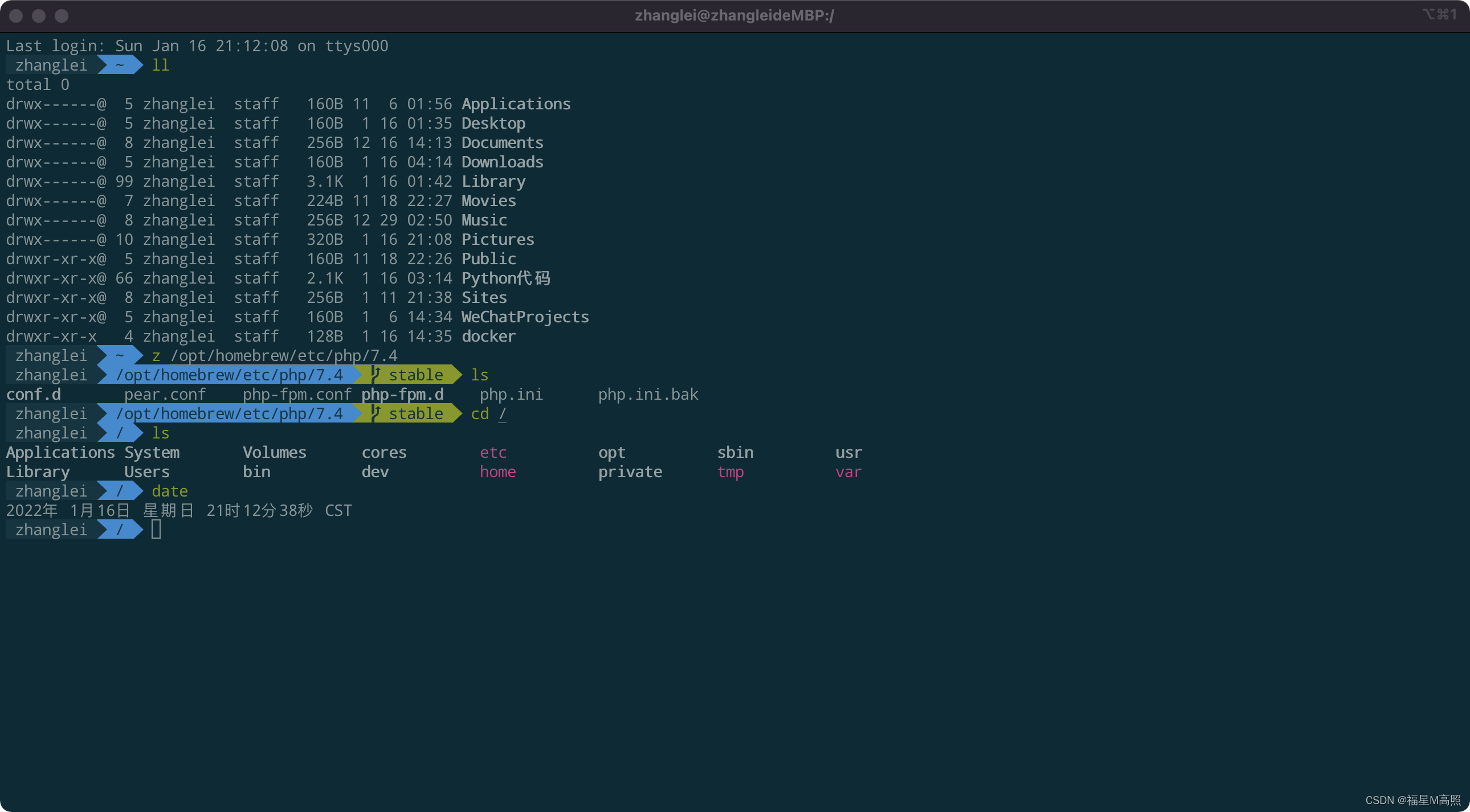
## 安装iTerm2 3.4.10 汉化中文版
点击下载:[下载](https://myimages.25531.com/20231019/iTerm.7z) (含常用配置 + 片段)
> 安装汉化版iTerm2需要开启特殊权限
```
开启任意软件安装权限:sudo spctl --master-disable
关闭任意软件安装权限:sudo spctl --master-enable
```
> 开启黑暗模式 → 首选项 → 外观 → 常规 → 主题
## 安装字体
1. cd ~
1. git clone https://github.com/powerline/fonts.git --depth=1
1. cd fonts
1. ./install.sh
1. cd ..
1. rm -rf fonts
## 安装Oh My ZSH
```
sh -c "$(curl -fsSL https://raw.githubusercontent.com/ohmyzsh/ohmyzsh/master/tools/install.sh)"
```
## 修改 zsh 配置
1. 编辑zsh配置文件
```
vim ~/.zshrc
```
2. 禁用自动更新(将下面这行命令解除注释)
```
zstyle ':omz:update' mode disabled # disable automatic updates
```
3. 修改主题
```
#ZSH_THEME="robbyrussell"
ZSH_THEME="agnoster"
按Esc后输入:wq保存
source ~/.zshrc
```
4. 安装zsh-autosuggestions与zsh-syntax-highlighting
把插件仓库克隆到$ZSH_CUSTOM/plugins (默认位置是 ~/.oh-my-zsh/custom/plugins)
```
git clone https://github.com/zsh-users/zsh-autosuggestions ${ZSH_CUSTOM:-~/.oh-my-zsh/custom}/plugins/zsh-autosuggestions
git clone https://github.com/zsh-users/zsh-syntax-highlighting.git ${ZSH_CUSTOM:-~/.oh-my-zsh/custom}/plugins/zsh-syntax-highlighting
```
5. 增加插件
```
找
plugins=(git)
改
plugins=(
git
extract
zsh-autosuggestions
z
gitignore
cp
sudo
zsh-syntax-highlighting
)
```
> 插件说明
1. [git](https://github.com/ohmyzsh/ohmyzsh/tree/master/plugins/git)(git缩写命令)
2. [extract](https://github.com/ohmyzsh/ohmyzsh/tree/master/plugins/extract)(解压命令,命令名为:x 1.zip 或 extract 1.7z)
3. zsh-autosuggestions = 历史代码自动感知
4. [z](https://github.com/ohmyzsh/ohmyzsh/tree/master/plugins/z)(跳转历史访问过的目录,如:z mysq + tab键)
5. [gitignore](https://github.com/ohmyzsh/ohmyzsh/tree/master/plugins/gitignore)(生成gitignore,如:gi python,flask > .gitignore)
7. [cp](https://github.com/ohmyzsh/ohmyzsh/tree/master/plugins/cp)(带进度拷贝文件,名称:cpv electerm-1.23.28-mac-arm64.dmg ~/Downloads)
8. [sudo](https://github.com/ohmyzsh/ohmyzsh/tree/master/plugins/sudo)(为已经输入的命令的前面加上sudo快捷键:快速按下2次Esc键)
9. zsh-syntax-highlighting = 语法高亮
6. 刷新.zshrc
```
source ~/.zshrc
```
## 修改vim ~/.oh-my-zsh/themes/agnoster.zsh-theme [下载](https://myimages.25531.com/20231019/agnoster.7z)
```
找
prompt_context() {
if [[ "$USERNAME" != "$DEFAULT_USER" || -n "$SSH_CLIENT" ]]; then
prompt_segment black default "%(!.%{%F{yellow}%}.)%n@%m"
fi
}
改
prompt_context() {
if [[ "$USERNAME" != "$DEFAULT_USER" || -n "$SSH_CLIENT" ]]; then
#prompt_segment black default "%(!.%{%F{yellow}%}.)%n@%m"
prompt_segment black default "%(!.%{%F{yellow}%}.)$USER"
fi
}
```
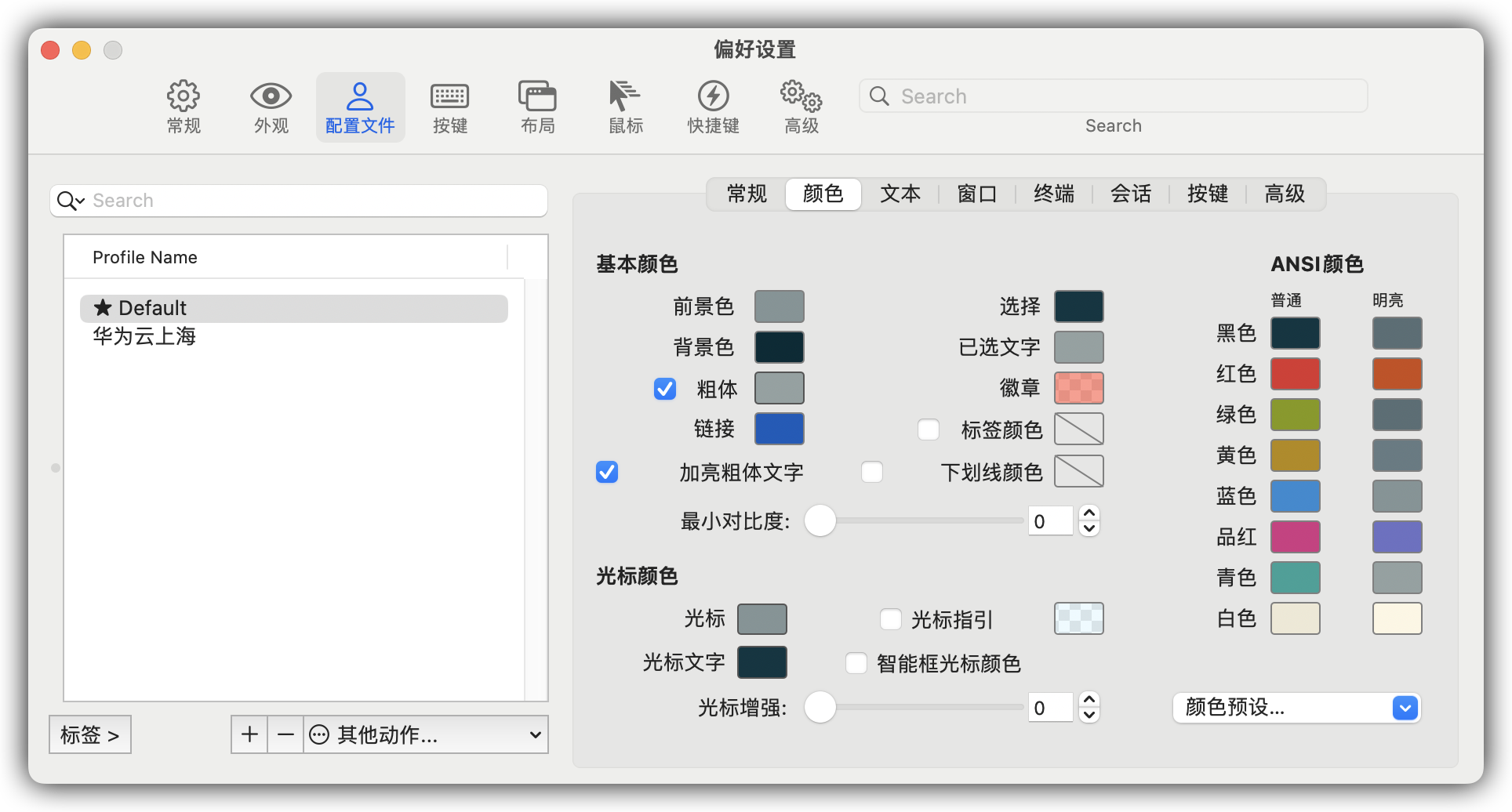
## 修改颜色 打开iterm2设置->配置文件->颜色(明亮下面第一个颜色不是图片上的颜色就改为:586e75)
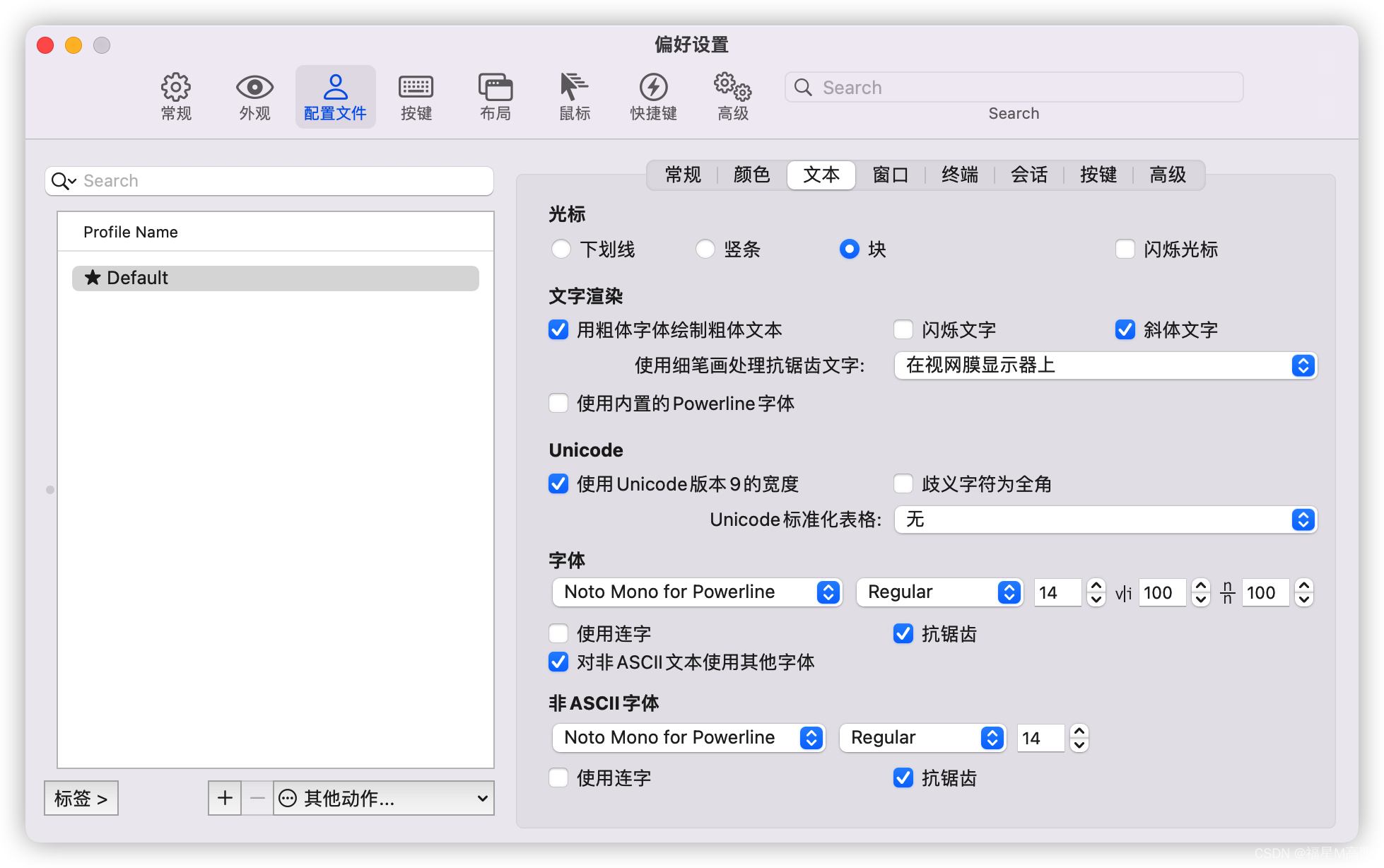
## 修改字体 打开iterm2设置->配置文件->文本
## 效果预览